Dynamics AX 2012 Excel Add-in – Issues and Solutions
Purpose: The purpose of this document is to outline some issues you may encounter when using Dynamics AX 2012 Excel Add-in for import of data and provide solutions to resolve them.
Issue: “This operation is not supported for a relative URI”.
Reason: This issue occurs because AppFabric Service Bus endpoint is not configured. AppFabric Service Bus endpoints are similar to WCF endpoints. The only difference is that specific binding are used to communicate with relay service. The ‘sb’ represents the scheme used to communicate with the AppFabric Service Bus. The scheme can be either ‘http’ or ‘sb’ depending on the binding you are using. Endpoints can be configured in application configuration files or programmatically. Alternatively you can delete the endpoint if you don’t use it.
Dynamics AX Error
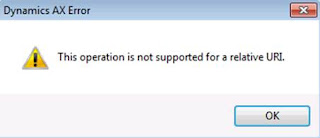
Solution: Please delete or configure ‘sb’ endpoint. ‘sb’ endpoint has no address defined which is treated by Dynamics AX Excel Add-in as relative URI. Below I show how to delete ‘sb’ endpoint.
Microsoft Dynamics AX Configuration Utility
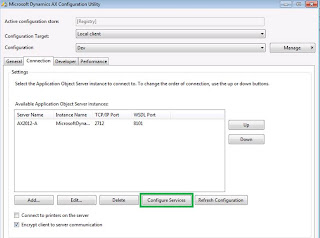
Opening Microsoft Service Configuration Editor dialog

WCF Configuration Editor
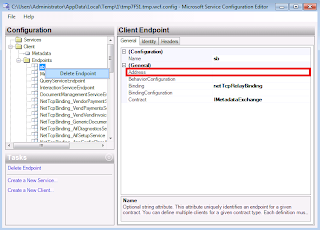
Save Changes to WCF Configuration
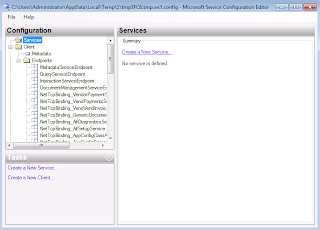
Restart Excel
Author: Alex Anikiev, PhD, MCP
Tags: Dynamics ERP,Dynamics AX 2012, Excel, Dynamics AX 2012 Excel Add-in, Data Import, Data Conversion, Data Migration, Application Integration Framework, Issue, Problem, Solution, Resolution.
Note: This document is intended for information purposes only, presented as it is with no warranties from the author. This document may be updated with more content to better outline the issues and describe the solutions.